 hnoss
hnoss
Widgets
Every widget is a procedure taking the frame's ^Ui. Stateful ones take a pointer to state you own, which is also their identity for focus. Each has a runnable example: ./build.sh run w_<name>.
box
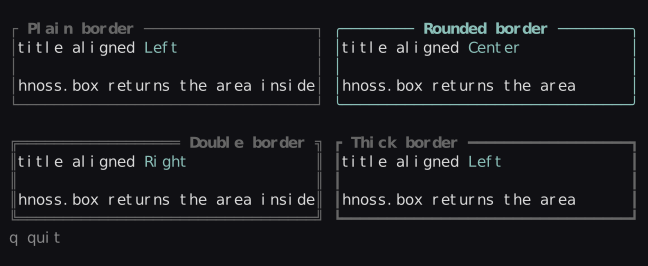
A border with an optional markup title. Returns the area inside it, ready for the next widget.
| Box_Options | |
|---|---|
border | .Plain .Rounded .Double .Thick .None (default: theme.border_kind) |
focused | draw with theme.border_focused |
align | title alignment |
style · fill | extra border style · blank the inside with this style first |
label
paragraph
Wrapped, scrolling markup text with an optional scrollbar. Clicking it gives it focus.
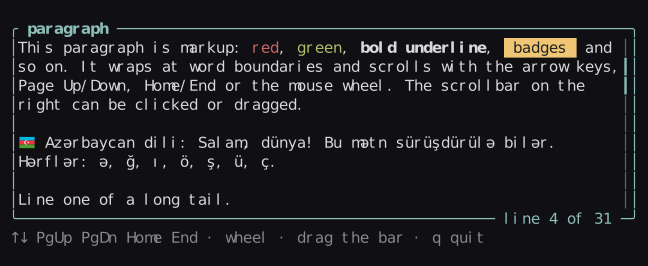
Keys (focused): ↑ ↓ PgUp PgDn Home End · mouse wheel when hovered. Options: wrap, align, scrollbar.
scroll_view
A viewport onto content bigger than area: width × height cells, where 0 means as wide or as tall as the viewport. It returns where the content sits on screen, already shifted by the scroll offset; draw any widgets into it, then call scroll_view_end. Drawing is clipped to the viewport, and mouse events outside it don't reach the widgets inside, so a button scrolled out of sight can't be clicked.
Scrollbars appear on the right and bottom edges when the content overflows. state.x and state.y are the scroll offset; set them yourself to jump. Scroll views nest.
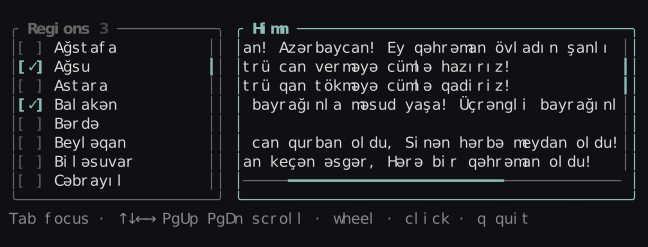
Keys (focused): ↑ ↓ ← → PgUp PgDn Home End · the wheel anywhere over it (Shift+wheel sideways) · a click on it focuses it unless a widget inside takes the click. Widgets inside that scroll themselves (a list) scroll with their keys, since the view takes the wheel.
content := hnoss.scroll_view(ui, inner, &view, 0, len(regions))
for name, i in regions {
    hnoss.checkbox(ui, {content.x, content.y + i, content.width, 1}, name, &picked[i])
}
hnoss.scroll_view_end(ui, &view)
list
A selectable, scrolling list. Returns true when the selection changed; state.activated is set for the frame Enter is pressed.
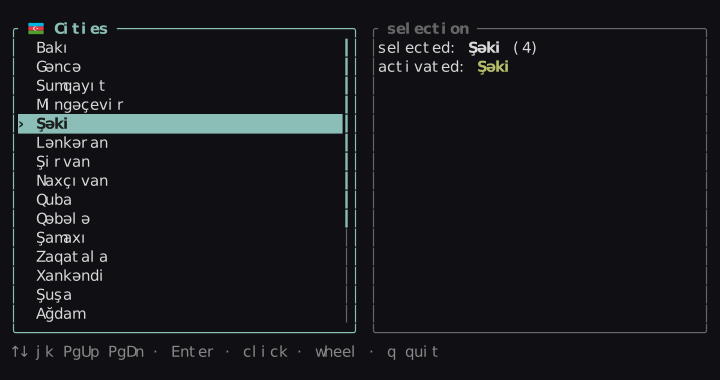
Keys (focused): ↑↓ or kj, PgUp PgDn Home End, Enter · click selects, wheel scrolls the view.
| Field | |
|---|---|
List_State | selected, offset (first visible), activated |
List_Options | marker (default "› "), markup (items are markup), scrollbar |
table
Rows of cells under a header. Columns are sized like a split; long cells end in …. Navigation and mouse work like list.
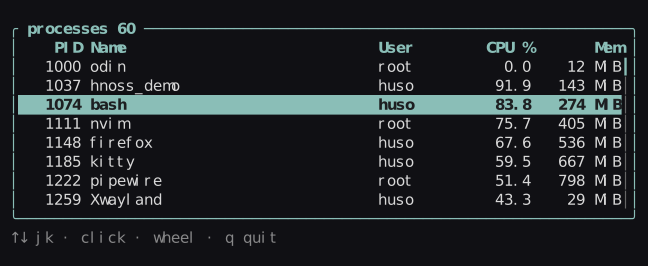
cols := []hnoss.Column{
    {title = "PID",  width = 7, align = .Right},
    {title = "Name", width = hnoss.fill()},
    {title = "CPU",  width = hnoss.percent(10), align = .Right},
}
hnoss.table(ui, inner, cols, rows, &state, {scrollbar = true})
tabs
A row of markup titles. The ^int is the state.
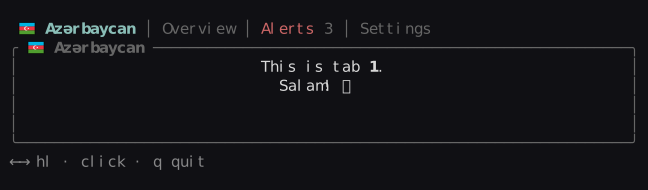
Keys (focused): ←→ or hl, Home End · click a title.
scrollbar
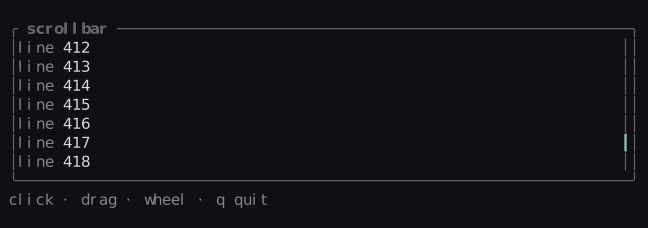
A vertical bar for total lines of which visible fit. Click the track to jump, drag the thumb (dragging keeps working outside the bar), or use the wheel. paragraph, list and table can draw one for you. hscrollbar, with the same parameters, is the horizontal one along the bottom row of area.
gauge
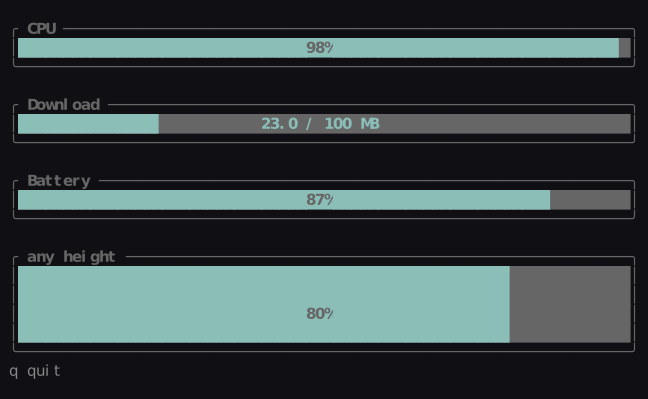
A progress bar of any height, filled in eighths of a cell. The label (default: the percentage) is centered and drawn inverted where it covers the bar.
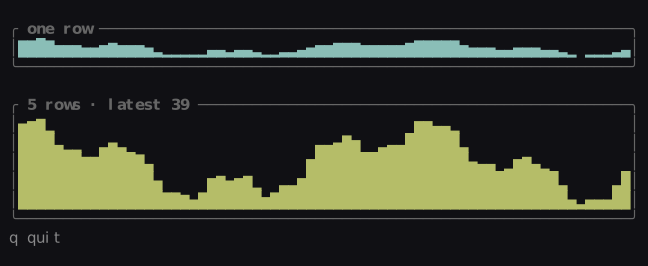
sparkline
The most recent values as bars, newest on the right, eight levels per row. max_value = 0 scales to the largest value shown.
graph
input
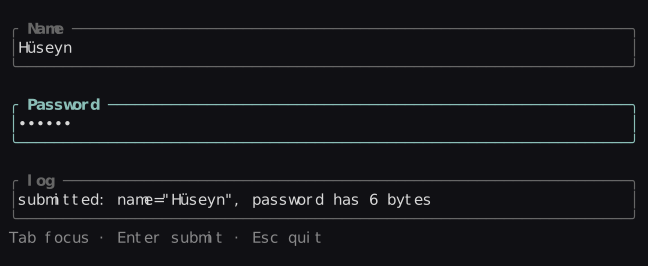
A single-line text field. Edits by grapheme, scrolls to keep the caret visible and shows the terminal cursor at it. Keys it uses are consumed, so typing q into it never quits your app.
| Keys | |
|---|---|
| ← → Home End Ctrl+A/E | move |
| Ctrl+←/→ · Alt+B/F | move by word |
| Backspace Delete Ctrl+D | delete a character |
| Ctrl+W · Alt+Backspace | delete the previous word |
| Ctrl+U / Ctrl+K | delete to start / to end |
| Enter | sets state.submitted for this frame |
| paste | inserted with newlines turned into spaces |
search: hnoss.Input_State
defer hnoss.input_destroy(&search)
if hnoss.input(ui, field, &search, {placeholder = "filter…"}) {
    filter(hnoss.input_text(&search))
}
Options: placeholder, mask (e.g. "•" for passwords). Helpers: input_text, input_set, input_destroy.
text_area
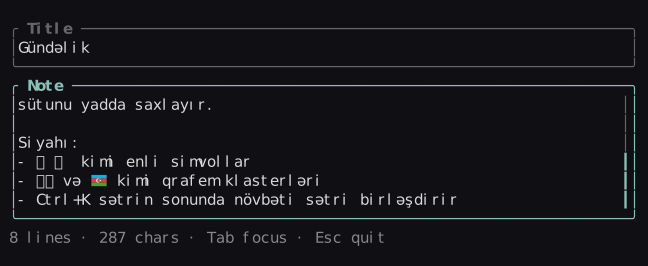
A multi-line text field, word-wrapped to the width of area. It edits the same Input_State as input, so input_text, input_set and input_destroy work on it and every key of the single-line field does too; state.scroll is the first visible row. It scrolls to keep the caret visible and shows the terminal cursor there.
| Keys (besides input's) | |
|---|---|
| Enter | new line |
| ↑ ↓ PgUp PgDn | move by wrapped row, keeping the column |
| Home End Ctrl+A/E | start / end of the line |
| Ctrl+Home/End | start / end of the text |
| Ctrl+U / Ctrl+K | delete to the line's start / end; at the end, Ctrl+K joins the next line |
| paste | keeps its newlines; tabs become four spaces |
note: hnoss.Input_State
defer hnoss.input_destroy(¬e)
hnoss.text_area(ui, inner, ¬e, {placeholder = "Write something…", scrollbar = true})Options: placeholder, scrollbar. Click places the cursor, the wheel scrolls.
checkbox · toggle · radio
The ^bool or ^int you pass is the state and the widget's identity for focus. Labels are markup. A focused choice is drawn like a selected list row; the mark uses theme.check.
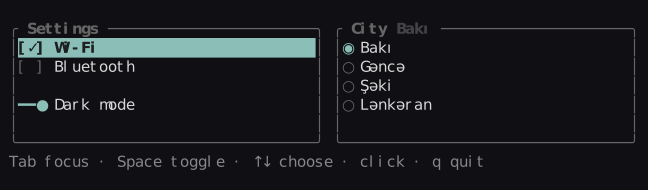
Keys (focused): checkbox and toggle Space Enter · radio ↑↓ or kj, Home End · click to toggle or choose.
wifi := true
city := 0
hnoss.focus_order(ui, {&wifi, &city})
hnoss.checkbox(ui, hnoss.cut_top(&area, 1), "Wi-Fi", &wifi)
if hnoss.radio(ui, area, {"Bakı", "Gəncə", "Şəki"}, &city) {
    reload(city)
}
button
Fills area and centers the markup label in it. Returns true on the frame it is pressed (also in state.pressed). A mouse press fires on release, only if the pointer is still over the button, so dragging away cancels; while held it uses theme.button_pressed.
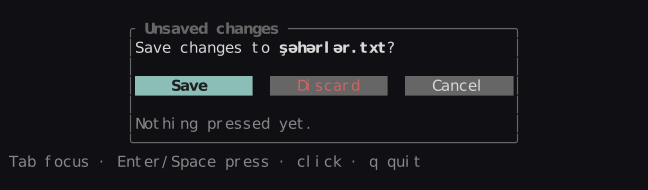
Keys (focused): Enter Space · click.
save, cancel: hnoss.Button_State
hnoss.focus_order(ui, {&save, &cancel})
if hnoss.button(ui, cols[0], "Save", &save) { write_file() }
if hnoss.button(ui, cols[1], "Cancel", &cancel) { close() }
Theme: button, button_focused, button_pressed.
modal
A dialog over everything drawn before it: the frame is dimmed, area is cleared and boxed, and the area inside is returned for the dialog's own widgets. Draw it last.
open is your flag for showing it. While it is true, the widgets under the dialog get no keys or mouse events, so a list behind it doesn't move when you press ↓. Esc or a click outside sets it to false; so can your own code, e.g. a Cancel button.
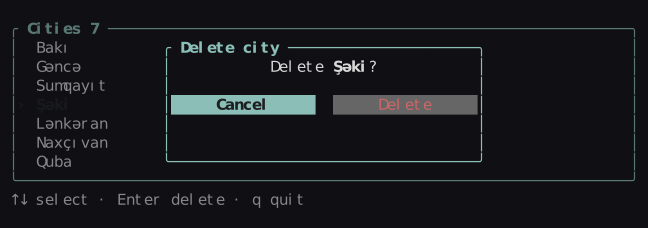
if confirm {
    d := hnoss.modal(ui, hnoss.center(f.area, 36, 7), &confirm, "[b]Delete city[/]")
    hnoss.focus_order(ui, {&cancel, &ok})
    cols := hnoss.split(hnoss.cut_bottom(&d, 1), .Horizontal, {hnoss.fill(), hnoss.fill()}, gap = 2)
    if hnoss.button(ui, cols[0], "Cancel", &cancel) { confirm = false }
    if hnoss.button(ui, cols[1], "Delete", &ok)     { remove(); confirm = false }
}
Theme: modal for the inside; the border uses border_focused.